November 6, 2026 • 9 Min Read
November 6, 2026 • 8 Min Read
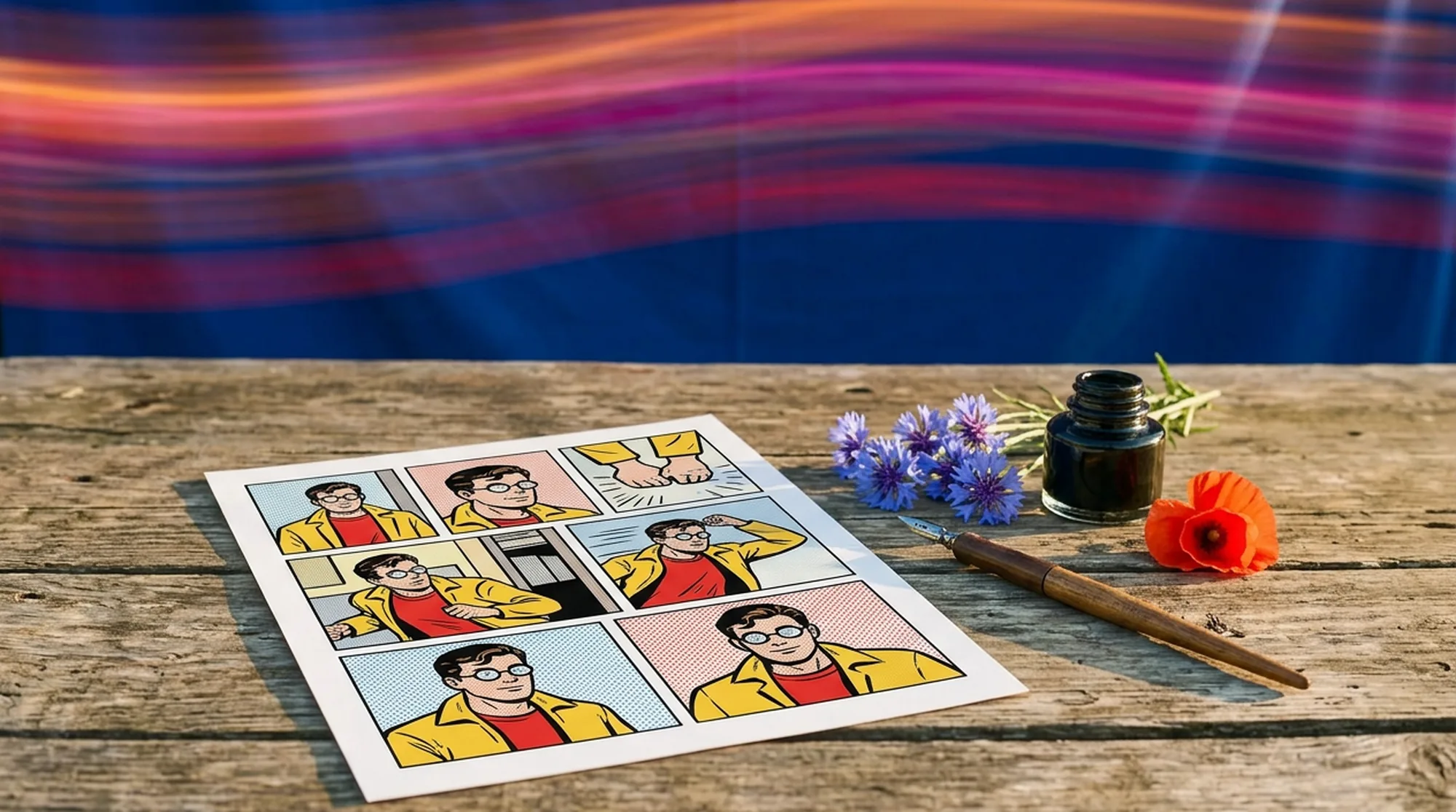
Melius turns a photo into a comic book panel and carries that character through a whole sequence on one canvas. Adobe Firefly generates panels from prompts and reference images, ChatGPT Images restyles an uploaded photo in conversation, Canva generates comic art from a prompt and lays it out with speech balloons, LlamaGen builds multi-panel comics around saved characters, and anicomic makes a four-panel strip starring the person in a selfie.
A single comic portrait is the easy part, and most tools manage it. It's the second panel where they start to differ, because the face and the ink style both have to hold.
We compared each tool on four things that decide whether a converted photo becomes a usable comic.
Tool | Best for | Input | Consistent characters |
Melius | A photo turned into a panel sequence that keeps the likeness | Photo, prompt, sketch | Yes, a character sheet connected to every panel |
Adobe Firefly | Prompt-led panels on Adobe's licensed-content models | Prompt, reference image, sketch | Yes, guided by a reference image or an earlier panel |
ChatGPT Images | Restyling one photo in a conversation | Photo, prompt, sketch on mobile | Within a conversation, with no saved character |
Canva | Comic art placed into strip layouts with speech balloons | Prompt | Not stated |
LlamaGen | Multi-panel comics from a script or story idea | Prompt, image, story idea, script file | Yes, saved characters and reference images |
anicomic | A four-panel strip starring the person in a selfie | Selfie | Yes, within one four-panel strip |
Melius, the AI-native operating system for creatives, runs its AI agents for creative work on top of a node-based canvas. Give Mel, the Melius agent, a photo and a style reference, and it sets up an image to image pass on that canvas using our library of leading models. GPT Image 2.5 accepts as many as 16 connected references, so a photo, a character sheet, and style frames can feed one panel.
Image Style Analysis reads 2 to 10 reference images and returns the look as editable text, which keeps the next panel in the same register as the last. The Storyboard template turns one image into nine panels. A one-off portrait takes more setup here than it would in a single-purpose converter.
Best for. Turning one photo into a comic book character that stays the same person for a whole sequence.
Firefly's AI comic generator starts from a prompt of up to 750 characters and offers style options for composition, visual intensity, lighting, and camera angle. Adobe says you can upload a reference image, a sketch, or an earlier panel through image to image to keep a character on-model, and Firefly Boards arranges finished panels into a strip.
Adobe says it trained Firefly's own image models on licensed content and public-domain data, and it asks you to review usage rights for partner models and outside assets. Exports come as JPEG or PNG, or as a 1080p MP4 for a teaser. Firefly's page is prompt-led, so a photo acts as guidance and isn't the thing being converted.
Best for. Prompt-led comic panels for teams that want Adobe's licensed-content models.
ChatGPT Images, now on version 2.5, lets you upload a photo and describe the change, so "redraw this as a comic book panel with heavy inks" is a complete request. A selection tool limits an edit to one area, an aspect ratio picker sets the panel shape, and on mobile you can sketch a layout and describe what to draw from it. It's available on every ChatGPT tier.
OpenAI says Images 2.5 is better at editing only what you've asked for while keeping the rest of the details the same, which helps a likeness survive a restyle. Consistency lives inside one conversation, though, and the help center documents no saved character or style to carry into the next chat.
Best for. Restyling a single photo, or a few, without leaving a chat window.
Canva's AI comic generator works from a text prompt and lists more than 20 styles, among them Sketch Color, Pop Art, and Vector. After generating, you describe changes like an outfit or a background, or open the image in the Canva editor.
That editor is where Canva differs from the rest of this list. Comic strip templates arrange the panels, speech balloons go on as editable layers, and teammates can comment and edit in real time. Canva says you own the designs you generate, between you and Canva, and adds that commercial use may not come with exclusive rights. Photo upload isn't part of the comic generator page.
Best for. Laying out a finished strip with dialogue while a teammate edits alongside you.
LlamaGen starts a comic from a text prompt, a character description, an image, or a story idea, and can generate from an uploaded script. It outputs comics, webtoons, manhwa, and manga, and lists a Turn Picture Into Comic tool alongside a storyboard generator.
You don't rebuild a character for each page, because LlamaGen saves them. Its own advice is to create the cast first, call each character by name, and keep one style template across the project, and it says plainly that this improves consistency without guaranteeing an identical face every time. A free plan is available, with paid plans adding credits.
Best for. Writers who start from a script and need the same cast on every page.
anicomic takes one selfie (JPG, PNG, or HEIC, up to 12MB), asks you to pick one of seven styles, and returns a four-panel comic with dialogue and a short beginning, middle, and end. The styles include Comic, with bold Saturday-morning colors, plus Manga, Manhwa, Manhua, Seinen, a romance look, and a golden fantasy one.
The format's fixed at four panels starring you, sized for sharing, with apps linked from its site. The free tier is a preview, Pro unlocks all seven styles, and a custom style comes with the annual plan.
Best for. A shareable comic of yourself or a friend in under a minute.
Open a canvas, attach the photo and one or two images in the comic look you want, and brief Mel the way you'd brief an illustrator.
Sample brief to Mel: "Turn the attached photo into a comic book panel in the style of the two references, with heavy black inks, flat color, and halftone shading. Keep his face, glasses, and jacket recognizable. Then build a character sheet from the result and use it for four more panels of him crossing a rainy city at night."
Mel picks the models, writes the prompts, and wires the nodes, and if your brief doesn't say which panel ratio you want, it'll ask. If the likeness slips on one panel, take over there. Edit that node's prompt and rerun it, or inpaint the face, and the other panels stay as they are. For other looks from the same photo, see our guides to turning an image into anime style and into a painting.
A page takes more than restyled photos. You plan the beats and build each panel from a prompt while the cast stays recognizable. On Melius the Storyboard template gives you nine panels from one image as a starting layout, and the character sheet goes into every panel node. Dialogue goes on last as text layers in a Studio node so the words stay exact. If your story starts as a drawing, the same canvas handles sketch to image first. The full workflow, from prompt to lettered page, is on our AI comic generator page.
Have a photo that should be a comic book character? Open Melius, attach it with one or two style references, and tell Mel what happens in the first panel.
November 6, 2026 • 9 Min Read
November 5, 2026 • 10 Min Read
November 4, 2026 • 9 Min Read