September 1, 2026 • 9 Min Read
September 2, 2026 • 9 Min Read
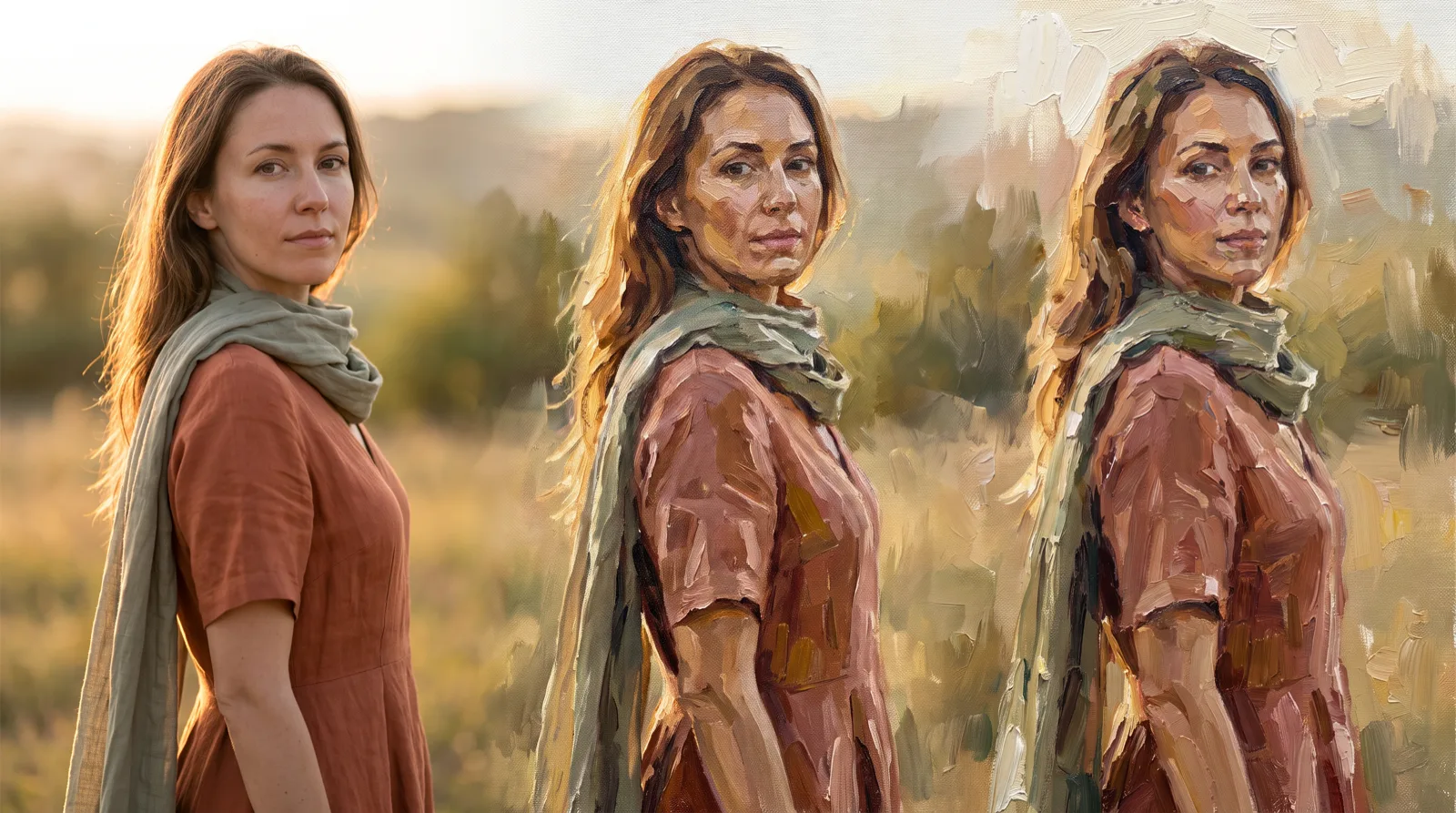
Any of the five below will do it in a few clicks, so choose on the harder question instead: whether you need one painting or a look you can apply again. That single distinction decides the tool, and getting it wrong is why people bounce between these products.
A preset gives you oil, watercolor, or sketch immediately and asks nothing of you. A described style takes longer to set up and then holds across twenty images, which matters as soon as this becomes brand or campaign work.
The other thing to watch is how much of your original survives. A painterly pass that loses your subject's face, or your product's shape, hasn't done the job, and tools differ on that more than on how attractive the output looks.
Four things worth testing before you commit.
There's a wide gap between picking oil painting from a menu and specifying warm golden-hour light from camera-left with painterly bokeh and a terracotta palette. The second is what you need to match an existing look.
The painterly effect and the recognizable subject pull against each other. Turn the effect up and the face goes; turn it down and it reads as a filter. A good tool lets you sit between those, and lets you say what must not change.
If image two has to match image one, the style needs to live outside the session as a saved reference, a written description, or a trained model. Otherwise small differences in your source photos produce visibly different results.
Free consumer tools and professional platforms answer the commercial-use question differently, and copying a living artist's style raises real exposure on top of that. Know where you stand before you publish.
How you specify a style | Repeatable across a set | Editing after the pass | |
Melius | Template, or a written style description from references | 5/5 | 5/5 |
Krea | 1000+ preset styles, style transfer, trained LoRA | 5/5 | 4/5 |
ComfyUI | You wire the pipeline yourself | 5/5 | 4/5 |
NightCafe | Named preset styles | 4/5 | 1/5 |
Artguru | Over ten named art styles | 2/5 | 1/5 |
Melius is a node-based creative canvas that empowers creators with AI agents to drive their work. It's first here because it covers both halves of the choice above: there's a one-click route, and there's a route that makes the look repeatable.
The quick way is the Painting Transformation template, which turns a photo into an oil or watercolor painting. The controllable way is the Image Style Analysis template: you drop two to ten reference images on the canvas, group them, and the template reads the group and writes out a description covering palette, lighting, mood, composition, and depth of field.
The qualifier is that the described-style route asks for setup you may not want. If you have one photo and want it painted this afternoon, running a style analysis first is more machinery than the job needs, and a phone app will get you there faster.
You own what you create and can use it commercially, subject to the underlying model providers' terms, and Melius does not use your work to train AI models. Every model runs from one subscription across the library of leading models.
Best for: a painterly look applied consistently across a set, and brand or campaign work where the style has to be defensible next quarter. See pricing for plans and credits.
Krea is a strong specialist on this list and the closest competitor on repeatability. It offers over 1000 preset styles alongside genuine style transfer, and it lets you train a custom model on your own images through LoRA fine-tuning, which is the most literal form of a reusable style available anywhere here.
Training a style is more commitment than writing one down, and it's less legible afterwards: a trained model is a black box where a written description is something a teammate can read and edit. Krea is also a suite of many capabilities, so painting is one thing it does among generation, video, 3D, and enhancement, which cuts both ways depending on whether you want focus or coverage.
Best for: anyone who wants a trained, reusable style and the widest preset library of the five to start from.
ComfyUI is the honest answer for anyone who wants total control and is willing to pay for it in time. It's an open-source node-based interface where you wire the pipeline yourself, which means any style-transfer approach that exists can be built in it, at whatever precision you want.
The cost is that you have to learn it, and nobody is coming to help. Setup, model management, and debugging are yours.
An App Mode exists to simplify the interface for beginners, though the full node graph is the reason to choose it. It's the right tool if the pipeline is the point and the wrong one if the painting is.
Best for: technical users who want to own the pipeline and don't mind maintaining it.
NightCafe is the lowest-friction way to find out whether this idea works for your photo at all. Its photo-to-painting page runs without a login and gives up to five free creations a day.
The styles are the ones people actually ask for: oil painting, watercolor, impressionist brushwork, pencil sketch, and more graphic digital looks.
The limit is control. You're choosing from styles instead of specifying one, so matching an exact reference is not what it's for, and paid plans buy more credits and models rather than more precision.
Best for: trying the idea at no cost, and one-off personal images where a good-looking result matters more than an exact style.
Artguru goes narrower on one thing: making the output look like an actual painting instead of a filtered photograph. You upload a photo, pick a style, and it handles the rest.
It publishes over ten art styles, with oil painting and watercolor alongside sketch, cartoon, concept art, and cyberpunk, and it says the set keeps growing.
It's a focused tool, so there's no wider editor and no workflow around it, and its own page doesn't state pricing or free-tier limits, so check those before you rely on it for anything commercial.
Best for: convincing painterly texture on a single image, when you want a named style and no decisions.
Drop the reference on the canvas and run Image Style Analysis on it. That turns somebody's mood board into a written direction, which is the thing that survives the handoff: an approved image can only be copied, but a described style can be argued with, edited and reapplied months later.
Branch from there rather than iterating in place. Five directions become five branches off one reference, sitting side by side where you can actually compare them, and the one that gets approved is already a working configuration you point at the next asset. Sketch to Image resolves a rough drawing if you're starting from paper, and the brand anchor keeps concepts inside the brand instead of drifting out of it.
For the loosest, strangest end of exploration, a dedicated image model will still propose more than this will. Use one, then bring the direction back here to make it repeatable.
If the painterly pass is one step inside a larger image job, the neighboring question is what happens behind the subject: see the best AI photo background editing tools. For a stylized rather than painterly pass, see the best AI tools to turn an image into anime style.
Start from the Painting Transformation template, then capture what worked as a style you can reuse. Open Melius.
September 1, 2026 • 9 Min Read
August 31, 2026 • 9 Min Read
August 19, 2026 • 7 Min Read